A family message arrives in Marathi. A school sends a notice home. A landlord shares a rental agreement. A job application asks for supporting papers. Many people need to translate Marathi to English, and the need shows up in everyday life, education, travel, work and official paperwork.
Pasting text into a translation box is easy. Getting an English version that is accurate and sounds natural takes a little more care. Marathi and English organize sentences differently. Marathi also carries information, such as gender, respect and tone, in places where English does not.
This guide explains what makes Marathi hard to translate, gives a six-step workflow, compares the main tools, and lists the mistakes to avoid.
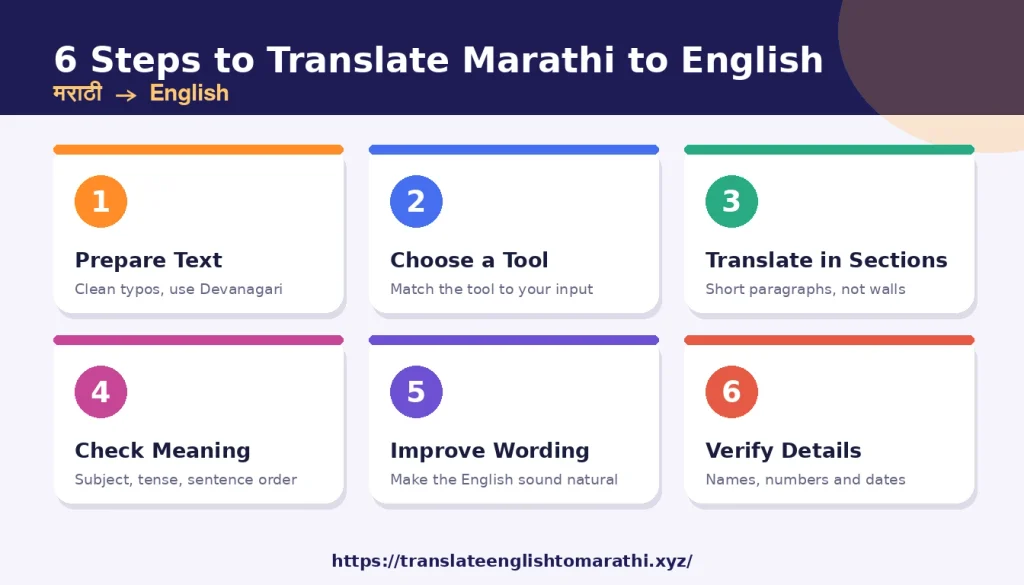
Quick Answer: To translate Marathi to English well, follow these steps:
- Clean up the Marathi text, ideally in Devanagari script.
- Pick a translation tool that suits your input (typed text, an image or a document).
- Translate in short sections.
- Read the English draft against the original for meaning, grammar and sentence order.
- Fix awkward wording, then double-check names, numbers and dates.
If the result matters, such as a legal, medical, immigration or job document, ask a fluent speaker or professional translator to review it.
Understanding the Main Challenges in Marathi-to-English Translation
Marathi and English belong to different branches of the Indo-European family. Their grammar works differently, so a tool can produce English that looks right but says something slightly different. Knowing the main trouble spots helps you spot those problems.
Differences in Marathi and English Sentence Structure
English usually puts the verb in the middle of the sentence. Marathi usually puts it at the end. Marathi also attaches small endings to nouns, where English uses separate words such as “from,” “to” or “with.”
Look at this sentence:
- Marathi: आई उद्या बाजारातून भाजी आणणार आहे.
- Word by word: Mother / tomorrow / market-from / vegetables / bring-will is.
- Natural English: Mom is going to bring vegetables from the market tomorrow.
The ending -तून on बाजार (market) becomes the English word “from.” If you copy the Marathi order, the English sounds broken. Good translation rebuilds the sentence instead of swapping words in place.
Verb Tenses, Gender, and Grammatical Meaning
Marathi verbs often show who is acting, and sometimes the speaker’s gender, through their endings. English needs a separate pronoun for this.
- तो घरी आला. → He came home.
- ती घरी आली. → She came home.
The Marathi subject can also be left out when the context makes it clear. Take “उद्या येतो.” It could mean “I’ll come tomorrow” (a male speaker) or “He is coming tomorrow.” Only the surrounding conversation tells you which.
Tense can also be easy to lose:
- पाऊस पडतो. → It rains. (a general fact or habit)
- पाऊस पडतोय. → It is raining. (right now)
Marathi also has two kinds of “we.” आपण includes the listener, as in “आपण जाऊया” (“Let’s go”). आम्ही excludes the listener. English uses “we” for both, so the translator has to read the context.
Formal Language, Respect, and Tone
Marathi has several ways to say “you,” and each sets a different tone. तू is casual, तुम्ही is respectful or plural, and आपण is more formal still.
- जेवलास का? → Did you eat? (casual, to one person)
- जेवलात का? → Have you eaten? (respectful)
- इथे बस. → Sit here. (casual command)
- तुम्ही कृपया इथे बसा. → Please have a seat here. (polite)
English has only one “you,” so the respect has to come through the wording. A tool may give the same plain sentence for both versions. You then need to decide whether the English should sound friendly, polite or formal.
Marathi Idioms, Expressions, and Cultural Context
Idioms are where literal translation fails most often.
- उंटावरून शेळ्या हाकणे literally means “to herd goats from a camel’s back.” It describes someone who gives orders or advice from a distance without doing the real work. Example: तो फक्त उंटावरून शेळ्या हाकतो. → “He only gives orders from the sidelines.”
- डोळ्यांत धूळ फेकणे literally means “to throw dust in someone’s eyes.” It means to deceive someone. An English match is “to pull the wool over someone’s eyes.”
Idiom meanings can shift with region and context. If a phrase looks strange, check it in a Marathi idiom reference before choosing the English wording.
How to Translate Marathi to English: A Step-by-Step Workflow
This workflow works for a short text message or a long report. Only the amount of checking changes.
Step 1: Prepare and Check Your Marathi Text
Better input gives a better translation. Prepare the text based on where it came from:
- Typed text: Fix obvious typing errors before you translate. A missing vowel sign can change a word completely.
- Copied messages: Chat messages often include slang, emojis, shortened words and mixed English. Keep the full message so the tool can see the context.
- Marathi typed in English letters: A sentence like “tu kasa aahes?” is harder for tools to read. Convert it to Devanagari first (तू कसा आहेस?), using a Marathi keyboard or a transliteration tool. The translation is then “How are you?”
- Text in images: Google’s Help Center says image translation accuracy depends on how clear the text is. Small, blurry or stylized text may not translate accurately. It suggests checking the language settings, using good light (the flash helps), and favoring clear, common fonts.
- PDFs: If you can select and copy the text, copy it. If the PDF is a scan, treat it like an image.
Scanned text needs a careful read for look-alike letters. For example, भात (cooked rice) and मात (defeat) differ by one shape, and so do घर (house) and धर (hold).
Step 2: Choose a Suitable Marathi-to-English Translation Tool
Choose based on these questions:
- What kind of input do you have: text, a photo, a document?
- Is the text short and casual, or long and formal?
- Is the content private? Check a tool’s privacy terms before you paste in confidential material.
- Will the result be used for something important? If so, plan for human review.
The next section compares the main options.
Step 3: Translate the Text in Manageable Sections
Translate one paragraph, or a few related sentences, at a time. Long blocks make it harder to compare the English with the source and harder to catch mistakes.
- Marathi: मी काल संध्याकाळी बाजारात गेलो होतो, पण दुकान बंद होते.
- English: I went to the market yesterday evening, but the shop was closed.
The Marathi गेलो होतो is a past-perfect form, so “I had gone” is also possible. The best choice depends on the story around the sentence. The ending -लो also tells you the speaker is male, but English doesn’t need to show that.
Step 4: Check Meaning, Grammar, and Sentence Order
Compare the English with the Marathi one sentence at a time. Ask three questions:
- Who did what? Check that the subject and object haven’t been swapped.
- Is the tense right: past, present or future, habit or right now?
- Is anything missing or added?
Here is an example:
- Marathi: त्याने मला सांगितले की तो उद्या येईल.
- Correct meaning: He told me that he will come tomorrow.
A weak draft might say “He told me that he came tomorrow,” which gets the future tense wrong. The mistake is small, but it changes the meaning completely.
Step 5: Improve Natural English Wording
Once the meaning is right, polish the English. Read it aloud. If a sentence sounds odd, rewrite it the way a native English speaker would say it.
- Marathi: कृपया लवकरात लवकर उत्तर द्यावे.
- Stiff: Kindly reply as early as possible.
- Natural: Please reply as soon as you can.
Both versions keep the meaning. The second one sounds more natural in modern English. Choose the tone to suit the reader: a friend, a customer, a teacher or an official.
Step 6: Verify Names, Numbers, Dates, and Important Details
This is the last check, and it matters most. Go back through the source and confirm each of these:
- Names: Spellings vary. जळगाव is usually written Jalgaon and कोल्हापूर as Kolhapur. For personal names, match the spelling on official documents such as a passport.
- Dates: Written dates such as १२/०३/२०२६ can be confusing. In India the usual order is day, month, year, which makes this 12 March 2026. Write the month out in English to avoid confusion.
- Amounts: Marathi uses lakh and crore, not million. For example, अडीच लाख means 2.5 lakh, or 250,000. Check that the figure is correct and the currency is stated.
- Addresses, phone numbers and reference numbers: Compare them character by character.
Best Tools for Translating Marathi to English
No single tool is best for every job. This section compares the main options. Features change over time, so check the official help pages before relying on a specific one.
- Google Translate. Google’s Help Center describes translating typed text, images, documents and websites, and writing by hand or with a virtual keyboard. Support for individual features can vary by language and device, so check the app for Marathi.
- Microsoft Translator. Microsoft’s Azure documentation lists Marathi for text and document translation. It also lists Marathi for automatic language detection and Custom Translator. In its scanned PDF and image document translation table, Marathi is listed as supported for both source and target. That table covers the Azure service used by developers and businesses, so the consumer apps may differ.
- Dictionaries. One option is the online edition of J. T. Molesworth’s A Dictionary, Marathi and English (1857) from the Digital Dictionaries of South Asia. It is a useful reference for tricky words, but because it was first published in the nineteenth century, some modern vocabulary may be missing.
- AI assistants. These can compare options, explain a phrase and adjust tone. They can also make mistakes or sound more certain than they should, so check any claim they make about a word or idiom against another source.
- Professional translators. A human translator understands context and can take responsibility for the result. This is the right choice for legal, medical, immigration and business documents.
| Tool or method | Best use | Main benefit | Limitation |
|---|---|---|---|
| Google Translate | Quick drafts of text, images and web pages | Offers several input types in one tool | Can miss tone, idioms and slang; feature availability varies by language |
| Microsoft Translator | Documents, Microsoft products and business use | Marathi is listed for text and document translation in its documentation | Needs the same review as any machine draft |
| Marathi–English dictionaries | Checking single words and meanings | Shows more than one meaning for a word | Older dictionaries may lack modern terms |
| AI assistants | Reviewing a draft, comparing wording, adjusting tone | Can explain why a sentence reads awkwardly | May be wrong; answers need checking |
| Professional human translators | Legal, medical, immigration and business documents | Understands context, tone and purpose | Costs more and takes longer |
Common Marathi-to-English Translation Mistakes and How to Avoid Them
Translating Each Word Without Understanding the Sentence
The problem: Word-for-word translation keeps Marathi order and produces broken English.
Example: तिने मला फोन केला. Word by word, this becomes “She me phone made.” The correct translation is “She called me.”
The fix: Read the whole sentence first, identify who did what to whom, then write it in English order.
Misinterpreting Words with Multiple Meanings
The problem: Many Marathi words have more than one meaning.
Example: वेळ can mean “time,” “occasion” or “turn.”
- मला वेळ नाही. → I don’t have time.
- तीन वेळा फोन केला. → I called three times.
The fix: Look at the words around it, and check a dictionary entry if two meanings fit.
Ignoring the Speaker’s Intended Tone
The problem: A short phrase can carry very different feelings.
Example: “बरं.” can mean “Okay,” or it can sound like a flat “Fine.” The same goes for काय चाललंय?, which can mean “What’s going on?”, “What are you up to?” or “How’s it going?”
The fix: Think about who is speaking, to whom, and in what mood. Then pick the English that matches.
Translating Idioms Literally
The problem: A literal translation gives a strange or comic result.
Example: “तो फक्त उंटावरून शेळ्या हाकतो” turns into a sentence about a man herding goats from a camel.
The fix: Notice the phrases that don’t make sense, look up their meaning, then express that meaning in natural English.
Making Mistakes with Verb Tense or Implied Subjects
The problem: Marathi often drops the subject, and tools sometimes guess wrong about who is acting.
Example: पुस्तक वाचून झालं. This could mean “I have finished reading the book,” or the reader could be someone else. Context decides.
The fix: Find the subject in the nearby sentences. If you can’t tell, ask the writer or flag the uncertainty.
Overlooking Errors in Scanned or Handwritten Text
The problem: Image text can be misread before translation even begins.
Example: If “भात” is read as “मात,” the English output will be wrong or confusing.
The fix: Zoom in and check the extracted Marathi text before translating. Retake blurry photos in better light.
Copying the Translation Without Proofreading
The problem: Machine output can look fluent while hiding wrong numbers, wrong tenses or missing phrases.
The fix: Read it twice. The first time, compare it with the source for meaning. The second time, read the English alone for flow. For important work, ask someone else to check it.
Tips for Getting More Accurate and Natural English Translations
- Read the full paragraph first. A sentence often depends on the one before it, especially when the subject has been left out.
- Use context to choose the meaning. Ask who is speaking, who is listening, and why the text was written.
- Break long passages into logical sections. Split at natural pauses, such as a new topic, speaker or date, rather than at a fixed length.
- Check names, dates, amounts and technical terms. These are the details readers act on.
- Compare alternatives when unsure. Try a second tool, or ask an AI assistant to offer a more formal and a more casual version of a sentence. Then choose based on your reader.
- Verify unfamiliar expressions in a dictionary. If a phrase seems strange, don’t guess. Look it up.
- Get a fluent speaker or professional translator to review important work. The more serious the consequences of an error, the more this matters.
Key Takeaways
- Marathi and English differ in verb position, endings and the way respect is shown, so word-for-word translation rarely works.
- Prepare your source text first: use Devanagari script, fix typos and check scanned text.
- Translate in short sections so you can compare the English with the original.
- Always check meaning, tense and who did what before polishing the wording.
- Verify names, dates and amounts last, because small errors there cause real problems.
- Treat machine translation as a draft. Use a human reviewer when accuracy matters.
Knowing how to translate Marathi to English comes down to this: use tools for speed, and use your own judgment for meaning.
Frequently Asked Questions
1. How can I translate Marathi to English online?
Open an online translator, choose Marathi as the source language and English as the target, then type or paste your text. Check the result against the original and fix any awkward parts. For documents or photos, look for upload or camera options.
2. What is the best free Marathi-to-English translator?
It depends on what you need. Google Translate and Microsoft Translator are widely used free options for quick drafts. Pick the one that handles your input type best, and compare outputs when accuracy matters. No free tool is perfect, so review the result.
3. Can I translate Marathi sentences into English?
Yes. Short sentences usually work best. Enter one sentence at a time, then check the tense, the subject and the tone. If the translation seems odd, look for an idiom or a missing subject.
4. How do I translate Marathi text from an image?
Use a tool with camera or image upload. Make sure the photo is sharp, well lit and straight. Google’s Help Center notes that unclear or stylized text may not translate accurately. Check the extracted Marathi text before trusting the English.
5. Can I translate a Marathi PDF document into English?
Often yes. If you can select the text in the PDF, copy it into a translator in sections. Some tools also accept file uploads, so check their help pages for supported formats. Scanned PDFs are more difficult because the text must be read from an image first. Check the formatting and details afterward.
6. Why does Marathi-to-English translation sometimes sound incorrect?
Several things can go wrong: different sentence order, dropped subjects, gendered verb endings, several possible meanings for one word, and idioms. Tone also changes how a sentence should be written. A tool may choose a plausible but wrong option.
7. Can AI tools help translate Marathi into natural English?
Yes, they can help you review and improve a draft. You can ask for a more formal or casual version, or for an explanation of a confusing phrase. They can still make mistakes, so verify important claims and details with a dictionary or fluent speaker.
8. How can I translate Marathi messages into English?
Copy the full message, including nearby messages if context helps, and paste it into a translator. Watch for slang, shortened words and mixed English. If the message is written in English letters, convert it to Devanagari first for a clearer result.
9. Is machine translation suitable for official documents?
Not on its own. It can help you understand the content or prepare a first draft. For legal, medical, immigration, academic or business use, have a qualified translator prepare or review the final version. Check with the organization receiving the document about its requirements.
10. How can I improve the quality of a Marathi-to-English translation?
Clean the source text, translate in sections, and compare each English sentence with the original. Then rewrite awkward phrases and verify names, dates and amounts. A review by a fluent speaker adds another layer of safety.
11. Should I type Marathi in English letters or in Devanagari?
Use Devanagari when you can. Marathi written in English letters has no standard spelling, which makes it harder for a tool to read. Microsoft’s documentation lists Marathi transliteration between Devanagari and Latin scripts for its service, and many keyboards offer similar options.
12. Do I need to know Marathi to translate it well?
You can get a useful rough translation without knowing Marathi. For anything important, a basic understanding of the grammar and context helps you catch errors. Without it, you will depend on a reviewer.
Pingback: How to Use Google Translate English to Marathi: A Complete Guide - Translate English to Marathi